Chrome extension
Install Investi for Chrome.
About a minute in Chrome or Edge on a computer. This page watches for the extension and ticks each step off, then connects it to your Investi in one click.
Steps
Download the extension
A small zip file. Chrome installs it from a folder on your computer because Investi isn’t in the Chrome Web Store.
Unzip it and keep the folder
Open the zip from your Downloads. You get a folder named
Investi-for-Schwab-0.1.12. Move it somewhere you won’t delete it, such as Documents. Chrome runs the extension from that folder, so if the folder goes, so does the extension.Open Chrome’s extensions page and turn on Developer mode
Copy this address, paste it into Chrome’s address bar and press Enter. Web pages can’t open it for you. In Edge, use
edge://extensions.chrome://extensionsThen switch on Developer mode, top right:

Click Load unpacked and choose the folder
Three buttons appear. Click Load unpacked, then choose the
Investi-for-Schwab-0.1.12folder from step 2. Select the folder itself, not a file inside it.
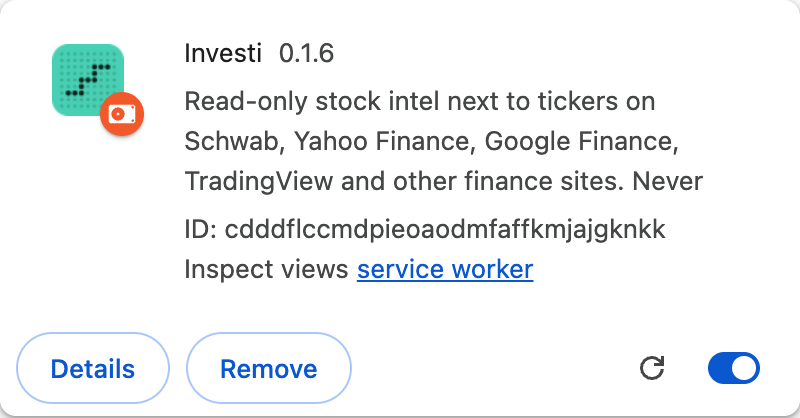
The Investi card shows up in your extensions. This page notices on its own:
Connect it to your Investi
Sign in to Investi on this computer, and this page connects the extension for you. No token to copy.
Sign in to connect
Updating
Download the new zip, unzip it, and replace the contents of your Investi-for-Schwab-… folder with it. Then click the reload arrow on the Investi card in chrome://extensions. It stays connected, because its ID never changes. It doesn’t update on its own outside the Web Store.
About the developer mode notice
Chrome may show a notice about developer mode extensions. That’s expected for anything installed outside the Chrome Web Store. Keep Investi switched on. The extension is read-only: it never places, changes or cancels an order.